


In short
Personalization, A/B testing and AI shopping tools work by changing the page in the browser, and that has a cost in speed and stability. The cost is manageable with four patterns: load the scripts without blocking the page, reserve space for anything they inject, scope each change to one slot, and give every experience an owner, an end date and a rollback. Then measure Core Web Vitals alongside conversion.
Why do personalization tools slow a store down?
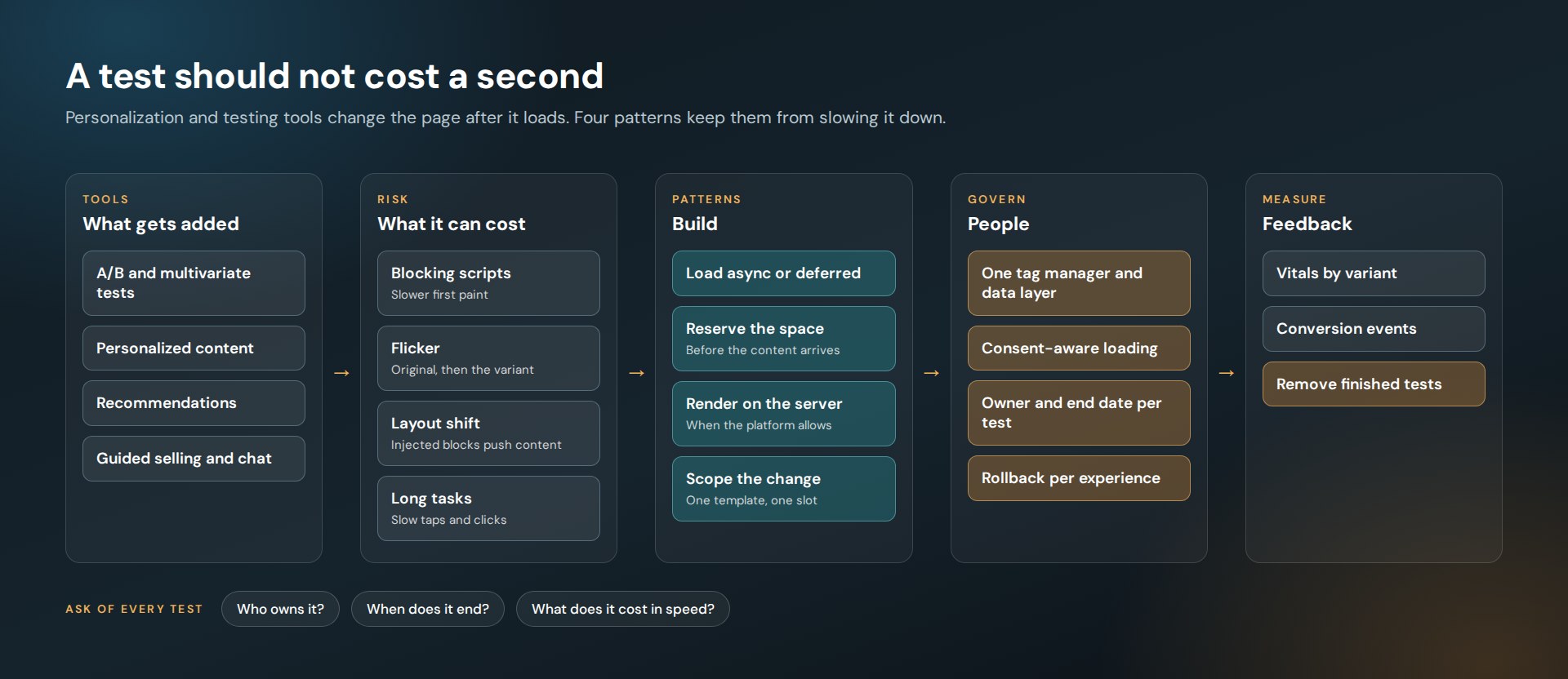
Most of them work the same way. A script loads, decides which experience this shopper should get, and rewrites part of the page.
Each step can hurt.
- The script loads before the page can render, so the first paint waits.
- The page shows the original, then swaps to the variant. Shoppers see a flicker.
- The new content takes more space than the old, and everything below it jumps.
- The script keeps the main thread busy, so the first tap feels slow.
Those map directly onto Core Web Vitals: slower LCP, higher CLS, worse INP. We explain the metrics in Core Web Vitals on a Large Catalog.
What tools are we talking about?
On JensonUSA.com we implemented several layers on top of the commerce platform.
- Monetate for A/B tests, personalization and dynamic content
- Bloomreach, including Exponea, for search, recommendations and marketing automation
- Preezie for conversational guided selling and product discovery
- BikeMatrix for compatibility and fitment checks across mountain bike parts
Each one earns its place. A rider who can confirm that a part fits the bike can buy with more confidence. The work is making sure four helpful tools do not add up to one slow page.
How do you load these scripts safely?
- Async or deferred, always. Nothing from a third party should block the first render. Google’s INP guidance names script evaluation on the main thread as a cause of slow interactions.
- Reserve the space. If a recommendation row will appear, its container has a fixed height before the content arrives. No jump.
- Scope the change. An experience targets one slot on one template. It does not rewrite the page.
- Prefer the server when you can. If the platform can render the variant in the HTML, there is no flicker to manage.
- Suppress where it does not belong. A chat or guided-selling widget does not need to load in checkout. We build enable and suppress logic per experience.
How do you stop tests from piling up?
With rules that sound boring and work.
- Every experience has an owner. A name, not a department.
- Every test has an end date. When it ends, the winner is built into the template and the test is removed.
- Every experience has a rollback. One switch turns it off without a deployment.
- One tag manager and one data layer. Tools read events from the same place instead of each scraping the page.
Finished tests left running are a common cause of slowdown. Each is small. Together they are load time nobody decided to spend.
What about consent?
Personalization uses behavioral data, so it has to respect privacy choices. Tags load according to the shopper’s region and consent state, and a signal such as Global Privacy Control is treated as an opt-out where the law requires it. The California Attorney General’s guidance covers the California rule.
Consent-aware loading has a side benefit. A tag that waits for consent is a tag that is not blocking the first render.
How do AI shopping assistants fit in?
They are the newest layer and they follow the same rules. A conversational assistant is a large script with its own interface. Load it after the page is usable, keep it out of flows where it distracts, and instrument it so you know whether shoppers who use it convert.
The instrumentation matters as much as the widget. Custom front-end events and analytics hooks tell the personalization stack what the shopper asked for, which makes every other layer better informed.
What should you measure?
Two things, side by side.
- Conversion events by experience: did the variant do what it was built for?
- Core Web Vitals by template, before and after: what did it cost?
A test that lifts add-to-cart and slows every product page is not a clear win. You only see that if both numbers are on the same report.
Where should a store start?
With an inventory. List every testing, personalization and marketing script on the site, who owns it and when it was last reviewed. Remove what nobody claims. Then apply the loading patterns to what is left.
If the store sits behind more than one CDN, the edge layer deserves the same discipline. We cover it in Multi-CDN for E-Commerce.
Running more tests than you can count?
Ask for a tag and performance auditFrequently asked questions
Does A/B testing slow down a website?
It can. Client-side testing tools load a script and change the page in the browser, which can delay rendering, cause flicker and shift the layout. Loading scripts asynchronously, reserving space and removing finished tests keeps the cost low.
What is flicker in A/B testing?
Flicker is when a visitor briefly sees the original page before the test variant replaces it. It happens when the variant is applied after the page has already rendered.
How do you prevent layout shift from personalized content?
Reserve the space in advance. Give the container a fixed size before the personalized content loads, so nothing below it moves when the content arrives.
How many third-party scripts are too many?
There is no fixed number. Set a performance budget for each template and check every script against it. If a script has no owner or no measurable benefit, remove it.
