


In short
Core Web Vitals are Google’s three measures of how a page feels to a real visitor: Largest Contentful Paint for loading, Interaction to Next Paint for responsiveness and Cumulative Layout Shift for visual stability. A page passes when 75 percent of visits meet the good threshold for each one. On a large catalog you fix templates, not pages, and the biggest wins are usually the hero image, third-party scripts and anything injected after load.
What are the Core Web Vitals thresholds?
Google defines a good experience as:
- Largest Contentful Paint (LCP) within 2.5 seconds
- Interaction to Next Paint (INP) of 200 milliseconds or less
- Cumulative Layout Shift (CLS) of 0.1 or less
Each is judged at the 75th percentile of page loads, split by mobile and desktop. In plain terms, three out of four visits have to be good. INP became a stable Core Web Vital in 2024, taking the place of First Input Delay. The definitions are on web.dev.
Why is a large catalog different?
A store with thousands of products does not have thousands of pages to fix. It has a handful of templates: home, listing, product, cart, content. Fix the product template and every product page improves.
It also means one mistake is multiplied. A script added to the product template for one campaign runs on every product page until someone removes it.
And the grade comes from real visits. Google assesses pages with field data from the Chrome UX Report, which reflects how real Chrome users experienced the site. A lab test on a fast laptop is a hint. The field data is the grade.
Where does LCP time go on a product page?
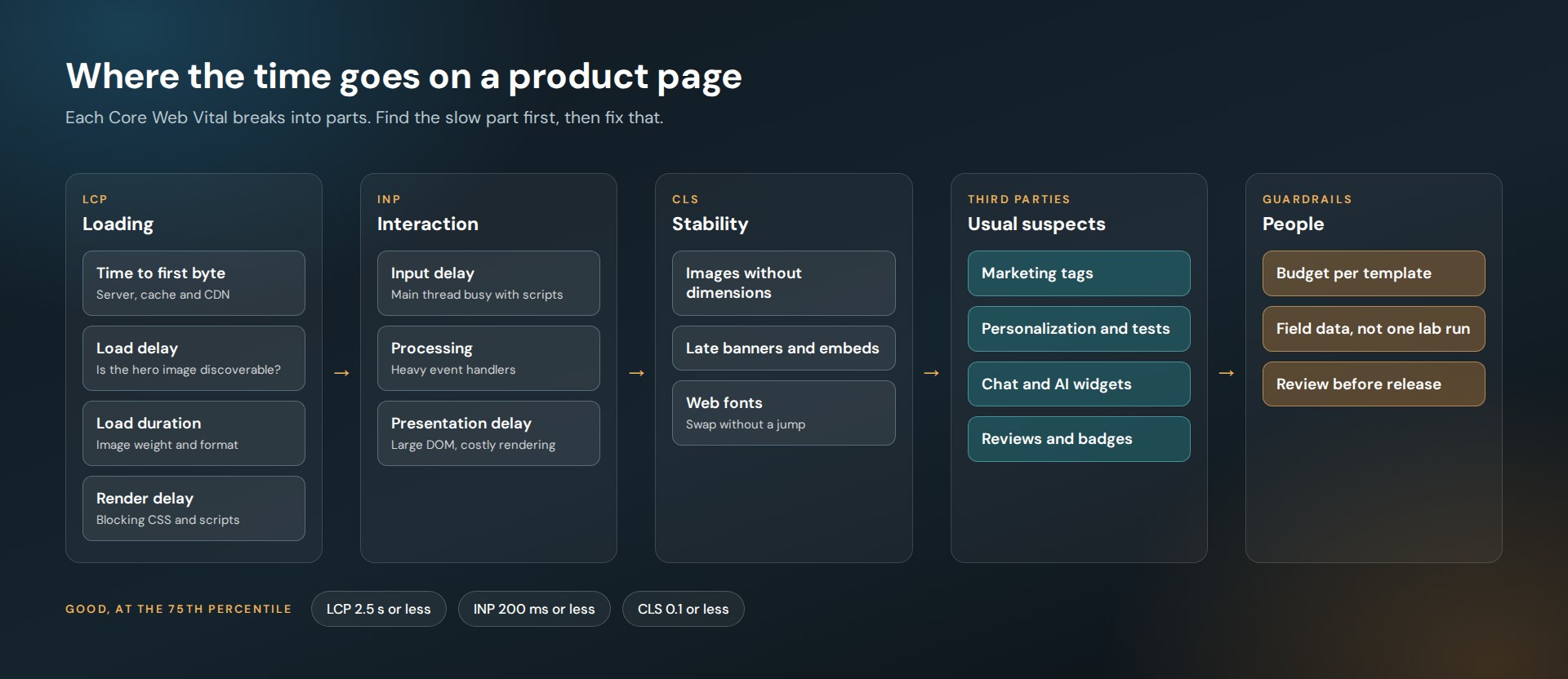
Google splits LCP into four parts: time to first byte, resource load delay, resource load duration and element render delay. Their LCP guide is worth reading in full.
On product and listing pages, the largest element is almost always an image. So the checklist is short.
- Make the hero image discoverable. It should be in the HTML, not added by a script. Do not lazy-load it.
- Raise its priority. Setting the image’s fetch priority to high tells the browser this image matters most.
- Send the right size. Responsive images in a modern format, sized for the slot.
- Clear the path. Inline the critical CSS and defer scripts that do not affect the first screen.
- Shorten the trip. Cache HTML where you can and tune the CDN. We cover that in Multi-CDN for E-Commerce.
What usually hurts INP?
INP measures the delay between a tap or click and the next visual update. Google’s INP guide breaks it into input delay, processing time and presentation delay.
On stores, the usual causes are:
- Third-party scripts keeping the main thread busy while the shopper is trying to tap a filter
- Heavy event handlers on filters, variant pickers and add-to-cart
- Large DOMs on listing pages with hundreds of product tiles
The fixes are to defer what is not needed yet, break long tasks into smaller ones so the browser can respond in between, and keep the page’s structure lean.
What causes layout shift on store pages?
Almost always something that arrives late and takes up space.
- Images and embeds without width and height
- Promo banners injected above the content
- Personalized blocks that load after the page renders
- Web fonts that swap in at a different size
The fix is the same each time: reserve the space before the content arrives.
What order should you fix things in?
This is the order we use.
- Read the field data by template. Find which template fails which metric on mobile.
- Fix the hero image on that template. It is usually the largest single win for LCP.
- Audit third-party scripts. List every tag, who owns it and whether it is still needed. Load the survivors async or deferred.
- Reserve space for anything injected. Banners, recommendations, reviews.
- Set a budget per template. Then check it before each release, so the gains do not leak away.
What did this look like at Jenson USA?
On JensonUSA.com we worked on LCP, CLS and INP across product, listing and landing templates. The methods were the ones above: script deferral, a critical CSS strategy, lazy loading below the first screen, CDN tuning, markup refactoring, asset optimization and performance profiling.
The store runs testing, personalization, guided selling and analytics tools on top of the commerce platform. Each of those is a third-party script with a cost, which is why tag governance matters as much as image weight. We wrote about that in Personalization Without the Slowdown.
Do Core Web Vitals affect rankings?
Google uses Chrome UX Report data to inform its page experience signals in Search. It is one factor among many, and relevant content still comes first. The stronger reason to care is that these metrics describe what shoppers feel: how long they wait, whether a tap responds and whether the page jumps under their thumb.
Want to know which template is costing you the most?
Ask for a performance reviewFrequently asked questions
What is a good LCP, INP and CLS score?
Google’s good thresholds are an LCP of 2.5 seconds or less, an INP of 200 milliseconds or less and a CLS of 0.1 or less, measured at the 75th percentile of page loads on mobile and on desktop.
What replaced First Input Delay?
Interaction to Next Paint, or INP. It became a stable Core Web Vital in 2024. It measures responsiveness across the interactions on a page instead of only the first one.
Why does my site pass in Lighthouse and fail in Search Console?
Lighthouse is a lab test on one device and connection. Search Console reports field data from real Chrome users on their own devices and networks. The field data is what Google uses.
What is the fastest way to improve LCP on a product page?
Start with the main product image. Make sure it is in the HTML, not lazy-loaded, given high fetch priority and served at the right size in a modern format.


